
Task
Different sources send the same state as completed, paid or 1. The CRM needs one controlled value.
Short answer
Create crm_status and add replacement rules: payment variants become paid, cancellation variants become canceled.
How to do it in Eofferix
- Create
crm_statusfrom the source status.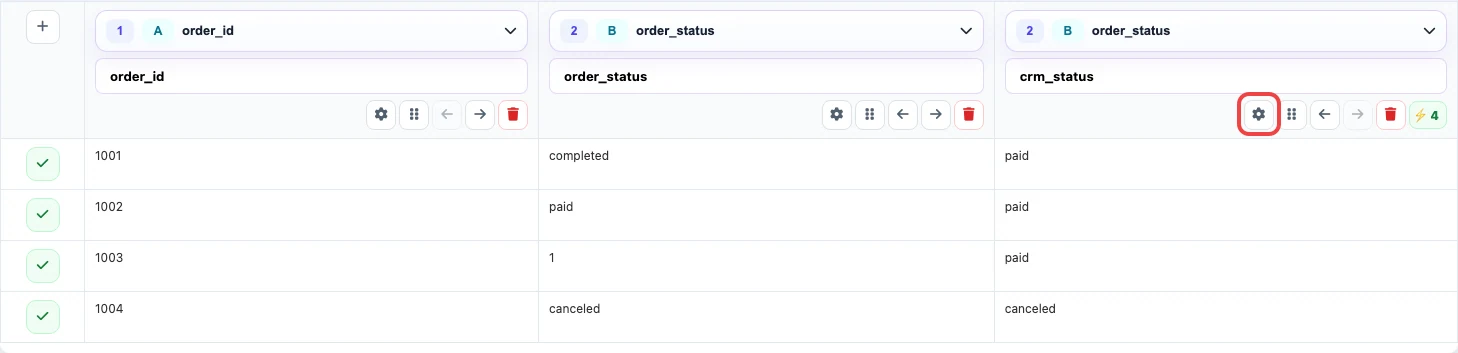
The table maps different source statuses to one CRM dictionary. - Add replacement rules for each known supplier value.
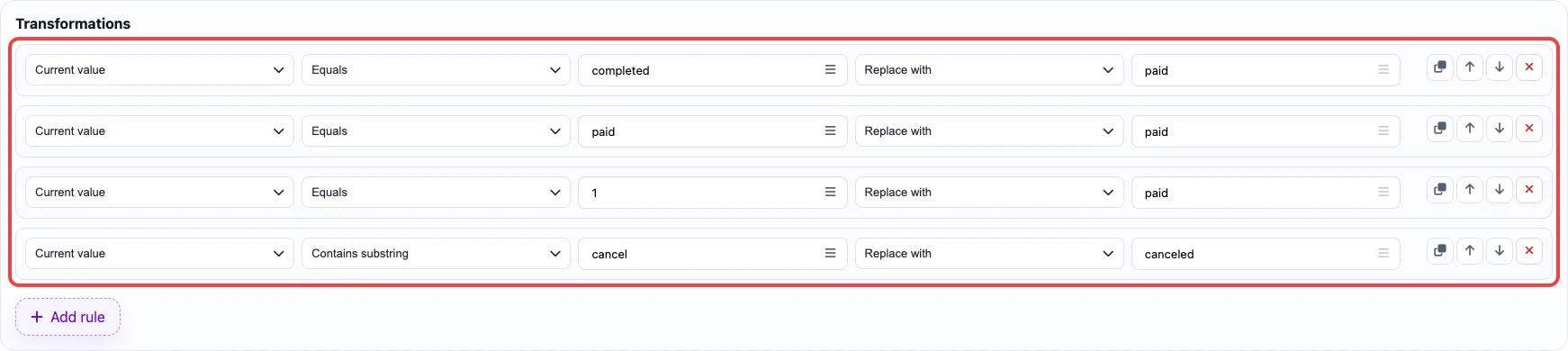
The rules replace supplier values with final CRM values. - Use exact matching for numeric codes so partial values are not changed by accident.
- Save the template and test it on real status samples.
Before / after
The data below is a training example and does not belong to real user files.
Before
source data| order_id | order_status |
|---|---|
| 1001 | completed |
| 1002 | paid |
| 1003 | 1 |
| 1004 | canceled |
After
result| order_id | crm_status |
|---|---|
| 1001 | paid |
| 1002 | paid |
| 1003 | paid |
| 1004 | canceled |