
Task
The file has old_price and price. The export needs discount_percent for a storefront or marketplace.
Short answer
Create a column from old_price, subtract the current price, divide by old_price, multiply by 100, then round.
How to do it in Eofferix
- Create
discount_percentfromold_price.
The output column shows the discount percent for each product. - Add a math subtraction rule with
{price}.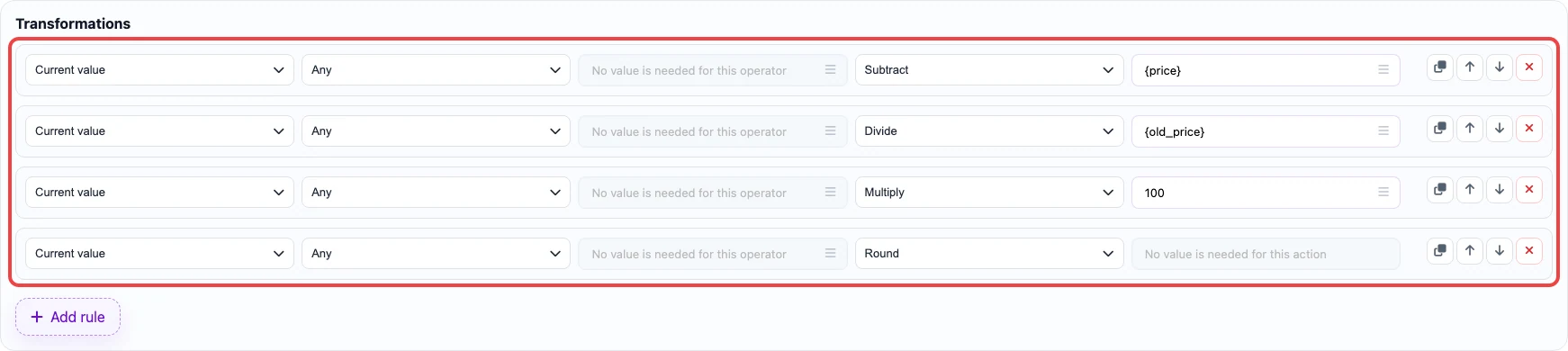
The calculation follows (old_price - price) / old_price * 100. - Divide the result by
{old_price}and multiply by100. - Round the value to the required precision.
Before / after
The data below is a training example and does not belong to real user files.
Before
source data| sku | old_price | price |
|---|---|---|
| SKU-1001 | 1200 | 900 |
| SKU-1002 | 1000 | 850 |
After
result| sku | discount_percent |
|---|---|
| SKU-1001 | 25 |
| SKU-1002 | 15 |