Eofferix takes supplier price lists, maps the fields to Ozon requirements and runs recurring exports: it updates prices, descriptions and photos, creates new products and hides outdated ones.
After registration, the free plan lets you work with small catalogs.
Short on time to learn the settings? We can connect your price list to Ozon and hand over a ready-to-use profile.
Sources we can use to export products to Ozon
1C
Any configuration that can export a product catalog.
Excel spreadsheets
Price lists and catalogs in XLS, XLSX and CSV.
XML files
Supplier price lists in XML and YML.
Google Sheets and Yandex Tables
Price lists maintained in online spreadsheets.
Email attachments
Files attached to incoming emails.
Supplier API
Product data exported through a supplier’s API.
Files on FTP
Price lists and catalogs hosted on an FTP server.
Google Drive and Yandex Disk
Files shared by link from cloud storage.
Inside the service
How your price list becomes an Ozon export
Set up the source, rules and connection once. Eofferix then repeats data preparation and delivery on your update schedule.
1
Connect your price list
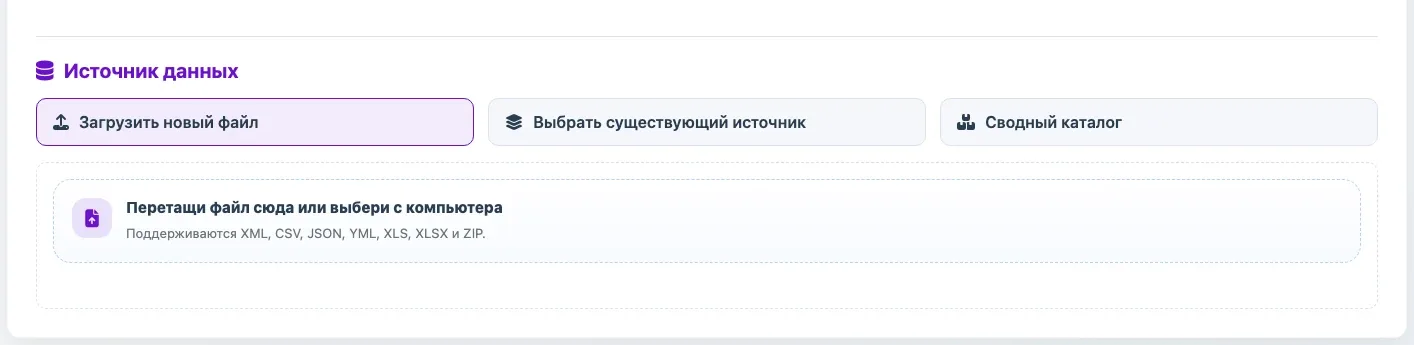
Upload a file, provide a link, connect FTP or collect email attachments. XML, YML, JSON, CSV, XLS, XLSX and 1C exports are supported. Multiple suppliers can first be combined in a unified catalog.
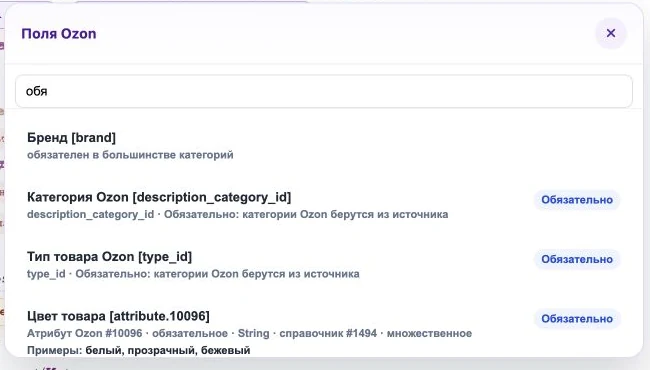
Identify the SKU, price, stock, name and images in your price list. For product cards, map categories and required attributes. Add markups, rounding and product filters here too.
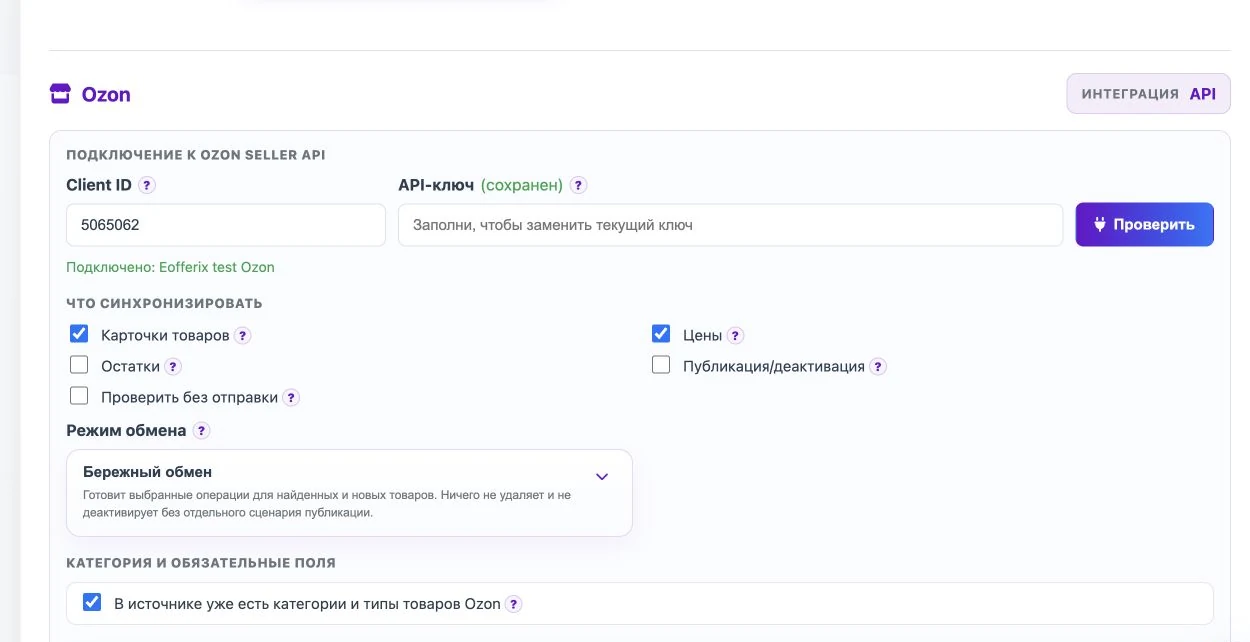
Enter your seller Client ID and API key in the profile. Choose to send product cards or update only prices and stock. The Excel template remains a separate option for manually uploading a file to Ozon.
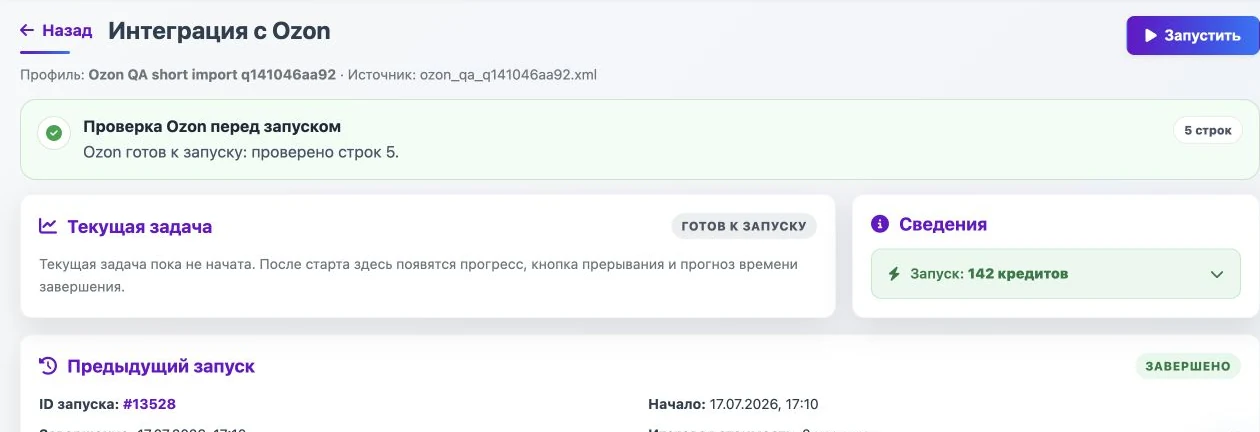
Review the data checks and messages before delivery. After the first verified run, save the profile and set a schedule. Run history and errors are available in the service.
Eofferix can merge price lists and catalogs from several suppliers into one unified catalog, normalize products and then export that data to Ozon. If you have one supplier now, start with a separate processing profile for that source.
What the workflow covers
Source as-is
XML, YML, CSV, XLS or XLSX without manual rebuilds before every update.
Scheduled runs for prices, stock or a full product file.
Error checks
Items without required data are skipped before delivery.
Typical Ozon rules
Skip incomplete items
Build names from Brand + Product name + SKU
Recalculate price: discount, markup, rounding
Select working images
Resize images
Convert photos to one format
Exclude selected product groups
Update only price and stock by offer_id
Map supplier categories to Ozon categories
Remove duplicates by SKU or barcode
Fill required fields with defaults
Split exports by warehouse or category
Automate product export to Ozon
Sign up, connect your sources and configure recurring delivery of product cards, prices and stock to Ozon. After registration, the free plan is available - try it and evaluate the automation.
Does Eofferix have direct Ozon Seller API integration?
Yes. Eofferix has a dedicated Ozon profile for sending product cards, prices, stock and publication actions through Ozon Seller API. The seller enters Client ID and API key in the profile, and the service validates data before delivery. The Ozon Excel template remains a separate workflow for manual file upload.
No. For one supplier, a profile is enough: source, processing rules and export to Ozon. A unified catalog is useful when you need to merge several sources, remove duplicates and choose the final data for export.
XML, YML, JSON, CSV, XLS, XLSX and CommerceML from 1C are supported. If the structure is custom, it can be parsed as a separate source and then mapped to Ozon fields.
Yes. A price list can be fetched from FTP or FTPS and used as a recurring source. This works when the supplier updates a file on its server and you need to pick up the latest version automatically.
A spreadsheet can be connected as a source if the service can access it by link or a supported loading method. Then it is processed like a table price list: structure, fields and rules are configured in the profile.
The minimum set depends on the scenario. Prices and stock need product identifiers and update values. Product cards add category, name, attributes, description, images and required Ozon attributes.
You can select working images, normalize links or files, resize and convert them. Products without required images can be filtered out before delivery.
What happens to products missing from the new price list?
It depends on the selected workflow. You can leave the card unchanged, update stock, or configure archiving and unarchiving through Ozon API for matched products. Direct product deletion should not be treated as the default scenario.
How is API export different from an Ozon Excel template?
API export sends prepared data to the seller account automatically through Ozon Seller API. The Excel template only prepares a file in Ozon format: you download it and upload it manually in the seller account. Both workflows can start from the same supplier source.
Both are possible. A one-time file can be checked manually, but Ozon work usually relies on a saved profile: it repeats the same transformations and can run on schedule.
Yes. If a supplier sends a file by email, configure an IMAP source: the service will find the message, take the attachment and continue processing through the profile rules.
Yes. You can use full or partial 1C export, including CommerceML. After import, fields and sections are mapped to the structure needed for Ozon delivery.
Yes. Rules can apply markup, discount, rounding, final supplier price logic and other transformations. This avoids manual editing before every delivery.
Yes. Filters can use category, required fields, price, stock, brand, product group or other conditions. Only products that pass the rules go into the export.
Run the profile on a sample or test set first and review the output file, skipped products and errors. After checking, send the result through API or use the file for manual upload.