
Before sending products, connect source values with Ozon fields. Eofferix shows your source and lets you choose where each value should go.
Choose product and offer roles
Use Element for the product card: name, description, images, brand, category, and shared characteristics. Use Trade offer for a concrete size, color, seller SKU, price, and stock.
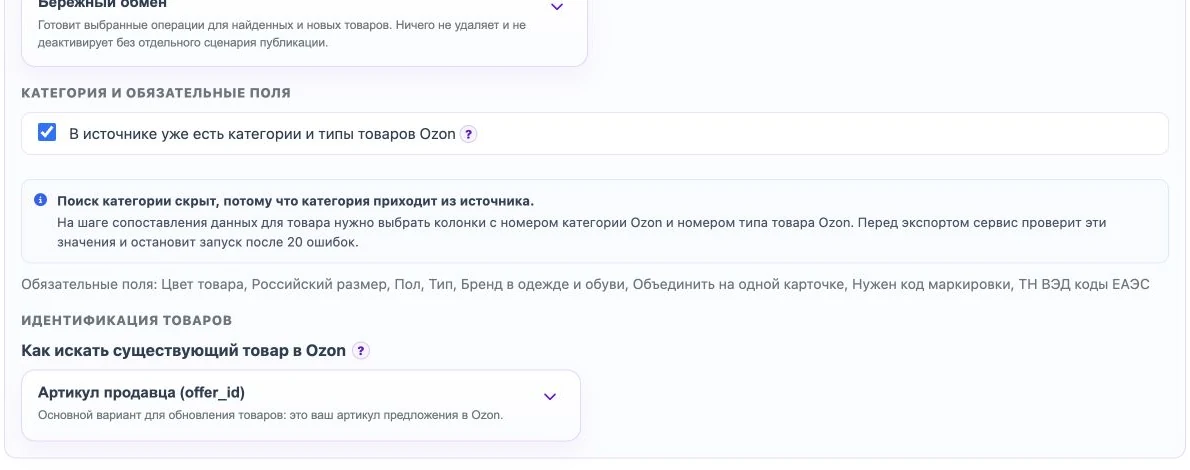
Category and required fields
If all products go to one Ozon category, choose it in profile settings and load the required fields. If one source contains products from different Ozon categories, enable the setting that categories and product types already exist in the source, then choose the source fields with the category number and product type.
Choose an Ozon field
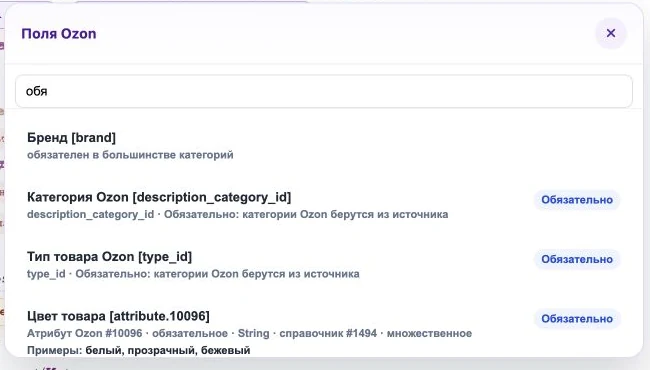
Click a source value and choose the Ozon field. Fields marked Required must be filled before the run can start. Some fields show example values from Ozon so you can understand what answer is expected.
What Eofferix checks
Before sending, Eofferix checks required fields, Ozon category, product type, seller SKU, price, and other selected data. If many rows have wrong category or product type numbers, the service shows the first 20 errors and does not start sending.