
When a product description arrives as HTML, image and file links are often embedded directly in the text: in src, href, or as a plain URL. Processing images and files in text finds those addresses, downloads files, applies image-processing rules, and replaces the links inside the same HTML.
Where to enable it
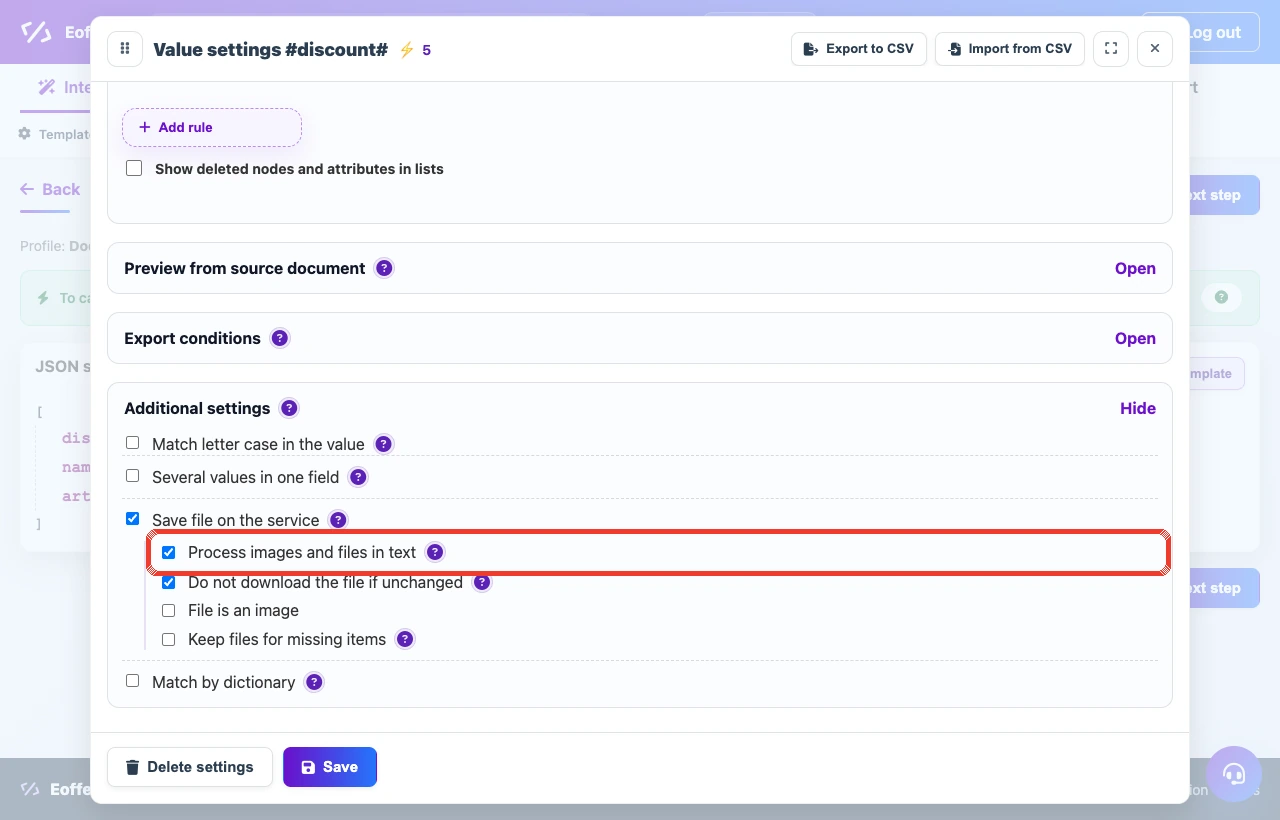
The setting is in additional value settings next to image and file processing. Use it for text fields that receive HTML descriptions of products, sections, or offers.
- Open the result field that stores the HTML text.
- Enable Save file on the service in additional settings.
- Enable Process images and files in text.
- Configure image rules if needed: resize, format, quality, or watermark.
- Run preview and check that links in the text were replaced with prepared addresses.
HTML description example
After processing, supplier links are replaced with prepared Eofferix links. During CMS export, those links are stored on the customer website.
Source field
<p>Product description with a photo:</p>
<p><img src="https://supplier.example/images/chair-blue.webp" alt="Blue chair"></p>
<p><a href="https://supplier.example/files/manual.pdf">Download manual</a></p>
After service processing
<p>Product description with a photo:</p>
<p><img src="https://app.eofferix.com/.../chair-blue.webp" alt="Blue chair"></p>
<p><a href="https://app.eofferix.com/.../manual.pdf">Download manual</a></p>
How the mechanism works
| Step | What happens |
|---|---|
| Link search | The service finds URLs in src, href, and plain text. Repeated addresses are processed once. |
| Download | Each found file is downloaded with safety and availability checks. If a file is unavailable, the original link remains in the text. |
| Image processing | Enabled image rules are applied: resize, format conversion, quality, watermark, and other settings. |
| Link replacement | Only the address is replaced. Tags, captions, alt text, and other markup remain. |
| Result without CMS | In a regular XML, JSON, or table result, the link points to a prepared Eofferix file. |
What happens during CMS import
| Target | Behavior |
|---|---|
| UMI.CMS | The service sends a file bundle with the import. The UMI.CMS module writes files to the website, and HTML receives local paths such as ./images/cms/data/eofferix/... or ./files/eofferix/.... |
| 1C-Bitrix | The 1C-Bitrix module downloads prepared links from src and file-like href, stores files through the Bitrix file system, and inserts a local path such as /upload/eofferix/.... |
| Other exports | If the receiver does not have an Eofferix module, the prepared service link remains in the result and can be used as a normal file URL. |