
Task
A table contains full page URLs. The export needs a separate domain column with only the domain, without http://, https://, www., path, query parameters, or anchor.
Short Answer
You can do it without regular expressions by searching and removing substrings. For mixed URL formats, the regex option is shorter.
How to do it in Eofferix with substring search and removal
- Create the final
domaincolumn fromurl. - In Transformations, add rules: Contains substring
https://— Remove substringhttps://; then the same rule forhttp://. - Add a rule: Starts with
www.— Remove substringwww.. - To remove path, query string, and anchor, use rule pairs for
/,?, and#: first Remove after, then Remove substring with the same character.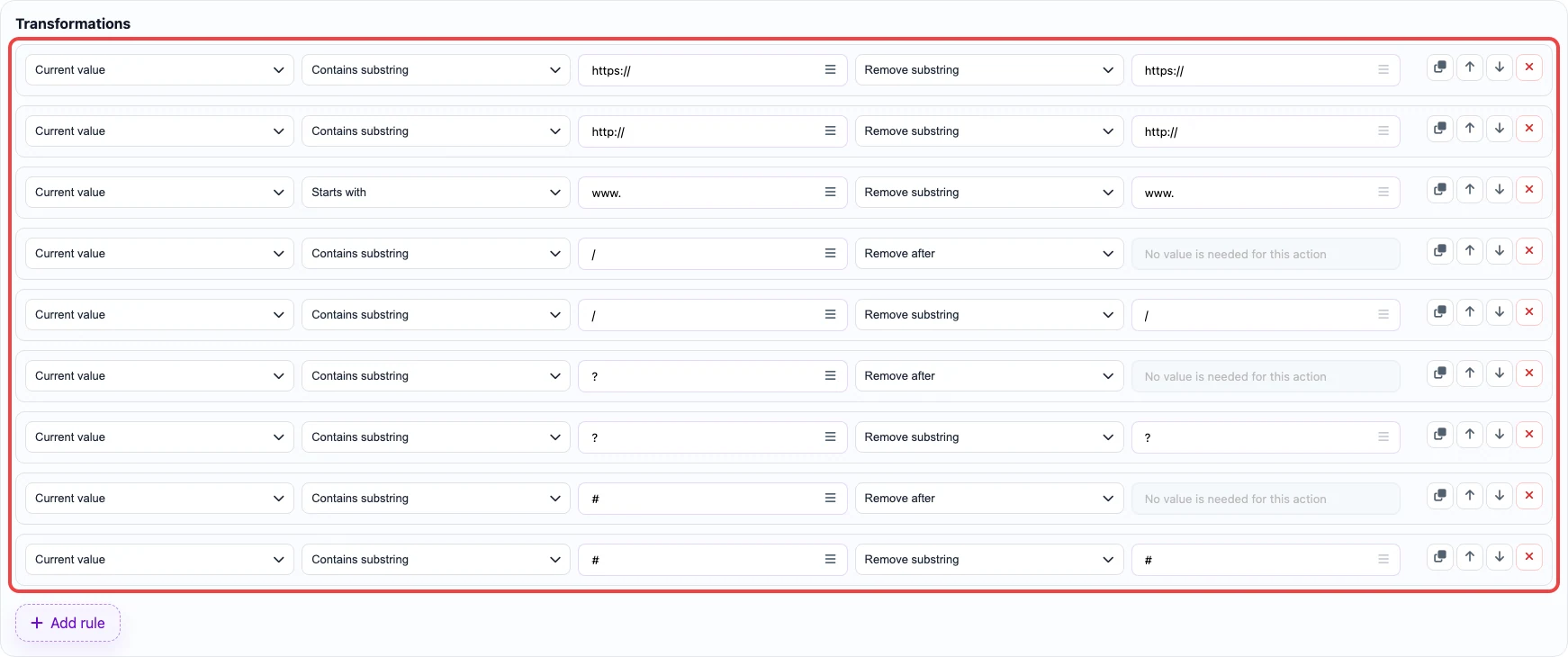
Without regex: protocol and www are removed as substrings; path and parameters are trimmed by separators. - Save the column settings.
How to do it in Eofferix with regular expressions
- Create the final
domaincolumn fromurl. - Add
^https?://— Remove substring.^means the start of the string,https?meanshttporhttps, and://is the literal protocol part. - Add
^www\.— Remove substring. The dot is escaped as\.because a plain dot in regex means any character. - Add
[/?#].*$— Remove substring.[/?#]finds the first path, query, or anchor separator,.*takes everything after it, and$means the end of the string.
The regex version is shorter: three rules remove the protocol, www, and everything after the domain. - Save the column settings.
Before / After
Before
source data| row_id | url |
|---|---|
| 1 | https://www.shop.example.com/catalog/jackets?utm_source=feed |
After
result| row_id | domain |
|---|---|
| 1 | shop.example.com |