
Task
One CSV contains physical products and digital items. Physical products need true; digital, service, and download items need false.
Short answer
Create Requires shipping: default to true, and set false for digital, service, or download.
How to Do It in Eofferix
Method 1: How to Do It in Eofferix with Regular Expressions
- Open the settings of the output
Requires shippingcolumn.
The click is on the settings icon of the output Requires shippingcolumn. - In
Transformations, the first rule setstrue; the second checks product type and changes digital items tofalse.
The Transformationsblock shows the full rule chain for this case. - Save the column settings and go to the
Exportstep.
Method 2: How to Do It in Eofferix with Substring Search
- Open the settings of the output
Requires shippingcolumn. - In
Transformations, replace the regular expression with separate rules for each text marker.If the source column contains longer phrases, get the same result without a regular expression: add several rules with
Contains substring, one rule for each marker.Order What to check Condition Action 1 Current value Any Replace with true 2 product_kind Contains substring digital Replace with false 3 product_kind Contains substring service Replace with false 4 product_kind Contains substring download Replace with false 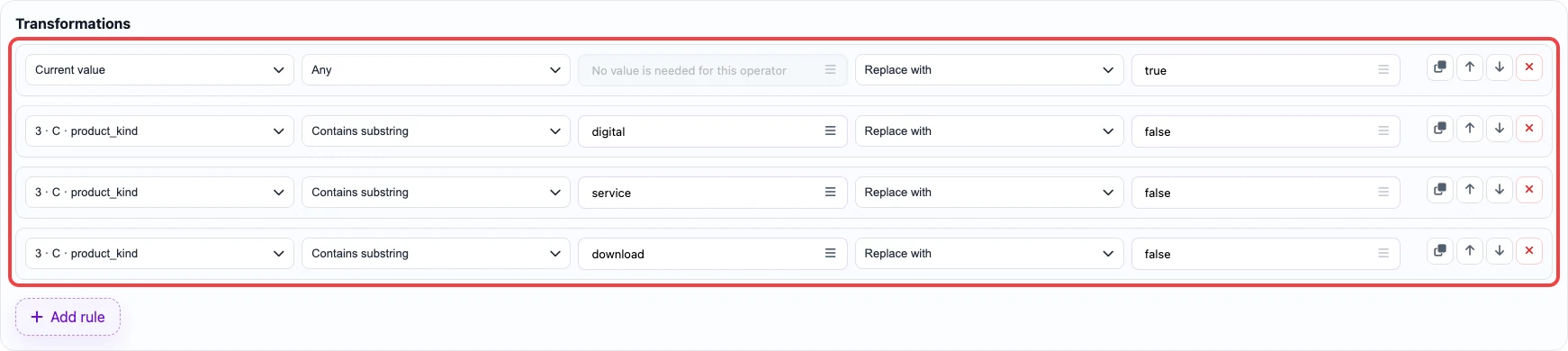
In the second method, each text marker uses Contains substring; the numeric1marker uses an exact comparison. - Save the column settings and go to the
Exportstep.
Before / After
Before
source data| Handle | Title | product_kind |
|---|---|---|
| desk-lamp | Desk lamp | physical |
| ebook-guide | PDF guide | digital |
After
result| Handle | Requires shipping |
|---|---|
| desk-lamp | true |
| ebook-guide | false |