
Task
One dimensions column contains values like 120 x 60 x 75 cm. A marketplace or catalog import needs separate length_cm, width_cm, and height_cm columns.
Short answer
Create three output columns and keep the needed number in each one with a regex. For width and height, remove the x separator and extra text after extraction.
How to Do It in Eofferix
- Open the settings of the
length_cmcolumn.
The table shows the source dimensionscolumn and three output dimension columns. - For
length_cm, add the regex[0-9]+(?:[,.][0-9]+)?withRemove everything except.
This rule keeps the first number: 120. - For
width_cm, use[x×]\s*[0-9]+(?:[,.][0-9]+)?, then removexand trim spaces.
The chain turns x 60into60. - For
height_cm, use[x×]\s*[0-9]+(?:[,.][0-9]+)?\s*(?:cm)?$, then removex,cm, and trim spaces.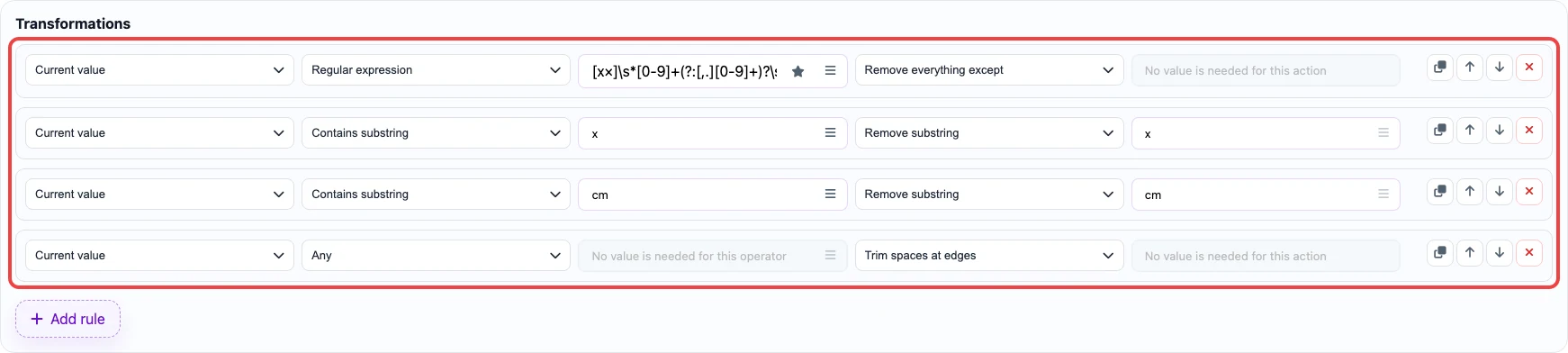
The last part of the string becomes 75. - Save the column settings and go to the
Exportstep.
Before / After
Before
source data| sku | dimensions |
|---|---|
| SKU-200 | 120 x 60 x 75 cm |
| SKU-201 | 80 x 40 x 45 cm |
After
result| sku | length_cm | width_cm | height_cm |
|---|---|---|---|
| SKU-200 | 120 | 60 | 75 |
| SKU-201 | 80 | 40 | 45 |