
Task
The product feed has a price column, and ads need product segments low, mid, high, and premium in custom_label_0.
Short answer
Create custom_label_0: first set low, then add rules by price: from 50 use mid, from 150 use high, from 500 use premium.
How to Do It in Eofferix
- Open the settings of the output
custom_label_0column.
The click is on the settings icon of the output custom_label_0column. - In
Transformations, place rules from the general default to higher price ranges so the last matching condition overwrites the label.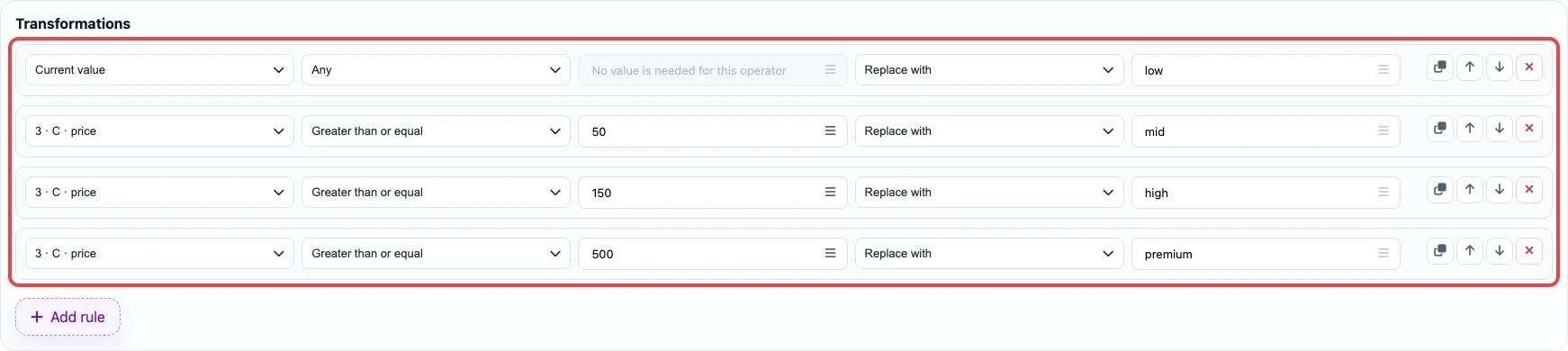
The Transformationsblock shows the full rule chain for this case. - Save the column settings and go to the
Exportstep.
Compact range syntax. For bounded intervals, use the In range condition and one value such as 50-149.99 or 591,5-1032.8. Both a dot and a comma are accepted as the decimal separator, both endpoints are included, and the lower endpoint must come first.
For the example above, the rule chain can be: Any → low, In range 50-149.99 → mid, In range 150-499.99 → high, and Greater than or equal to 500 → premium.
Before / After
Before
source data| id | title | price |
|---|---|---|
| GM-140 | USB cable | 9 |
| GM-141 | Desk lamp | 65 |
| GM-142 | Office chair | 220 |
| GM-143 | Premium sofa | 650 |
After
result| id | custom_label_0 |
|---|---|
| GM-140 | low |
| GM-141 | mid |
| GM-142 | high |
| GM-143 | premium |