
Task
One product may appear in several rows, for example when the same SKU has several tags, images, or properties. The final file needs one row per SKU.
Short answer
Open the column whose values must be collected, enable Change row structure → Merge similar rows, and choose the grouping key, for example sku.
How to Do It in Eofferix
- Open the settings of the
tagcolumn, because these values must be collected in one cell.
The animation shows the settings icon under the tag column. - In Additional settings, enable Change row structure, choose Merge similar rows, use
skuas the key, and use;as the separator.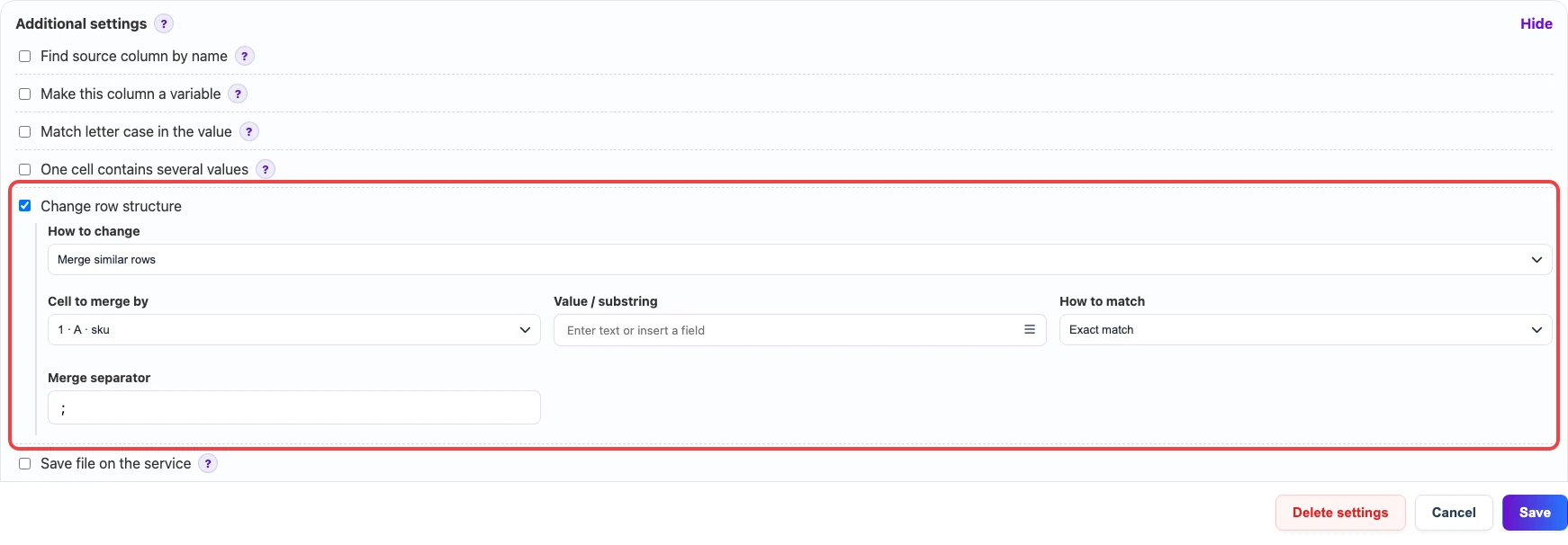
The settings merge rows by sku and join values with ;. Leave Value / substring empty to merge all repeats. - Save the column settings and continue to export.
Before / After
Before
source data| sku | name | tag |
|---|---|---|
| SKU-100 | Office chair | new |
| SKU-100 | Office chair | sale |
| SKU-200 | Writing desk | stock |
After
result| sku | name | tag |
|---|---|---|
| SKU-100 | Office chair | new;sale |
| SKU-200 | Writing desk | stock |