
Merge similar cells means grouping repeated table rows by a stable key and joining the values from one column into a single result cell.
This is useful for tags, image links, properties, or category labels when a supplier sends one product across several rows.
Where to find it
- Open the table snapshot.
- Open the settings for the column whose values you want to join. For tags, open the
tagcolumn. - Open Additional settings and enable Change row structure.
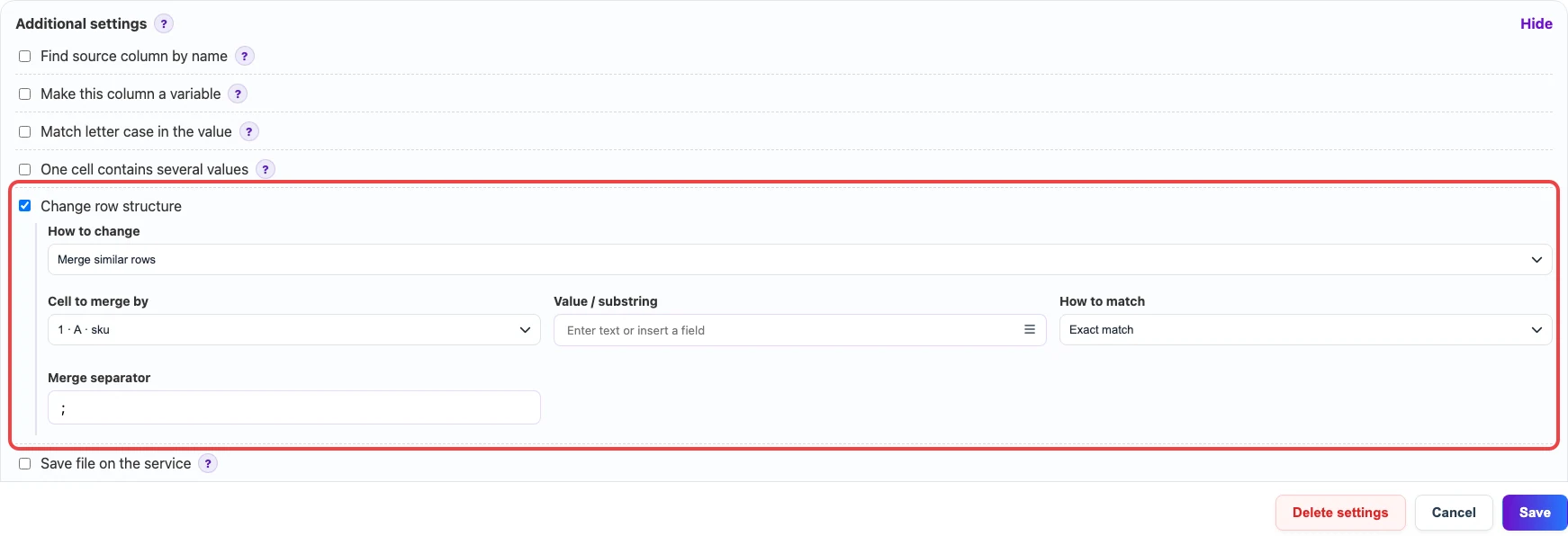
Change row structure, the selected mode is Merge similar rows. The values in this column are grouped by the same sku.How to set it up
- In How to change, choose Merge similar rows.
- In Cell to merge by, choose the key that identifies one product or record. In most tables this is
sku,id, or another product code. - Leave Value / substring empty if every repeated key should be merged. Fill it only when the merge should apply to a specific value or a text fragment.
- Keep How to match as Exact match when the previous filter is not needed or when you need to merge only specific rows. Use substring matching only for a text-fragment filter.
- In Merge separator, enter a visible text separator between joined values, for example
;or any other separator already used in the source file.
What the fields mean
| Field | Meaning |
|---|---|
Change row structure | Enables operations that change the number of result rows. It must be enabled for row merging. |
How to change | Choose Merge similar rows to collect repeated rows into one result row. |
Cell to merge by | The grouping key. Rows with the same key value become one result row. |
Value / substring | An optional filter. Empty means all repeats of the key are merged. If filled, merging applies only to rows that match this value or substring. |
How to match | How Eofferix checks Value / substring: exact value or substring. |
Merge separator | A visible text separator between the values joined into one cell. |
Example
The source table has two rows for the same SKU because the product has two tags. After merging, there is one row for that SKU and the tags are joined in one cell.
Before
| sku | name | tag |
|---|---|---|
| SKU-100 | Office chair | new |
| SKU-100 | Office chair | sale |
| SKU-200 | Writing desk | stock |
After
| sku | name | tag |
|---|---|---|
| SKU-100 | Office chair | new;sale |
| SKU-200 | Writing desk | stock |